Introduction to Technology Installs
Last updated: March 13, 2026
Technology Installs—also known as technographics—provide a comprehensive view into what technology products are used within an organization. This dataset surfaces detailed information about technology adoption across companies, including installation verification dates, deployment locations, and usage intensity. HG's data covers over 120 million technology installations used at more than 9 million companies worldwide, spanning 20,000+ products from 7,000+ vendors.
Installs are derived from content produced by the companies themselves, from documents like job postings, resumes, and other information found directly from sources like a company’s website. While digital signatures can be a great way to authenticate a data source, they limit the scope of products that can be detected, and lack context on where and by whom a product is used. HG approaches technology installs from both a digital and document-based vantage point to ensure the signals accurately portray how specific technologies are being used at an organization.
Data is refreshed on a weekly basis to capture new installations and to refresh existing install data.
What's included?
Every install contains basic company information, including Company name and URL.
Supporting details about the company are provided in the form of:
Revenue
Employees
Industry
Headquarter address
In relation to the install, fields are provided about the product itself that cover:
Product name
Vendor name
Category parent (as defined by HG)
Category (as defined by HG)
Attributes
All company/install combination data points are unique to the
company/install combination, including:
Install Country - Defines what country the signals indicating product usage are
derived from. It is common to see a company using the same product across
multiple countries.Date First Verified - Date of earliest install signal from source documents.
Date Last Verified - Date of most recent install signal from source documents.
Intensity - Total number of dates verifying the installation of the product.
How can I use technology installs?
Technology installs can help you run a competitive analysis of companies, prioritize accounts based on tech stack, better manage your territories, assess vendor and product penetration.
Install Localization
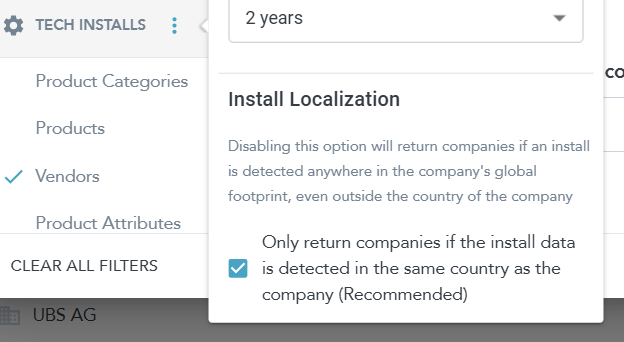
This setting controls whether Tech Installs results require the install detection to be in the same country as the company.
When checked (default, recommended): Platform only returns companies where the product install is detected in the same country as the company. This is the localized installs view.
When unchecked: Platform returns companies if an install is detected anywhere in the company’s global footprint, even outside the company’s country. This mirrors a global installs configuration often used in off‑Platform feeds.
If your HG data feed is configured for global installs and you want to replicate those counts in Platform, uncheck Install Localization when running your Tech Installs search with the same vendor and company filters.